
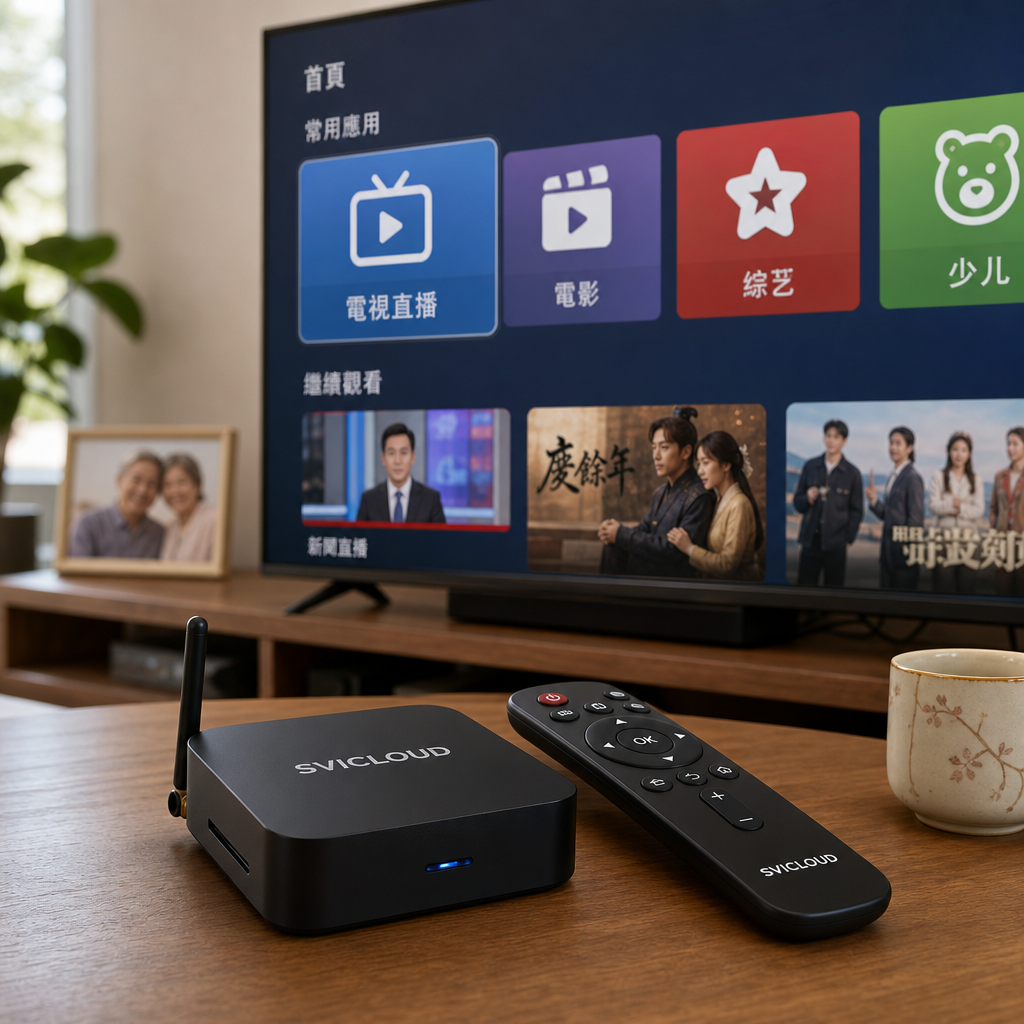
How to Set Up a Chinese TV Box for Seniors? A Practical Guide from Large-Text Interfaces to Remote Help
Many Chinese families in the U.S. face a similar situation: parents or grandparents live in California, New York, or Texas, and they usually want to watch Chinese news, dramas, variety shows, movies, or Mandarin-language content on YouTube. Their children also hope that familiar voices can keep them company at home, so they will not feel lonely because of language or operation barriers.
But when you actually start setting up a TV box for seniors, you often find that the issue is not whether they can watch content, but whether they know how to operate it:
- There are too many apps, and they do not know which one to click
- The text is too small, making program names hard to read
- If they press the wrong button on the remote, they do not know how to go back
- Accounts need to be logged in, Wi-Fi passwords need to be entered, and seniors may easily feel nervous
- Children do not live in the same city and cannot come over every time to help
So when it comes to how to set up a Chinese TV box for seniors, the key is not to turn on every feature, but to simplify the operation process into:
> Turn on the TV → Choose the familiar entry point → Start watching
This article takes the perspective of a family caregiver and organizes practical tips on large-text interfaces, shortcuts for frequently watched programs, remote control operation, voice search, remote help, and safety settings, helping you create a Chinese video environment that is easier for parents or grandparents to use.
---
Why should a Chinese TV box be set up differently for seniors than for younger users?
Younger users may be used to downloading apps themselves, switching accounts, searching for shows, adjusting picture quality, and quickly understanding the logic of different menus.
But for seniors, a TV box should preferably not be as complicated as a smartphone. What seniors really need is: fewer steps, easy-to-read text, easy-to-find content, and less fear of pressing the wrong button.
What seniors really need is 'fewer steps, easy-to-read text, and easy-to-find content'
When setting up an SVICLOUD TV box or another Chinese TV box for seniors, it is recommended to start from the usage scenario rather than from the features.
Seniors usually do not need a home screen filled with more than a dozen apps, and they do not necessarily need to know where every function is. What matters more is:
- Large enough font size
- Clear icons
- Fixed entry points
- Frequently watched content that is easy to find
- Remote control buttons that are not too complicated
- Knowing how to return to the home screen if they press the wrong button
You can think of the home screen as a 'senior-friendly TV remote menu' rather than a 'smartphone desktop.' The goal is to let seniors follow the same steps every day and watch familiar Chinese content.
Common usage needs in Chinese families in the U.S.
In areas with many Chinese families, such as California, New York, and Texas, seniors' needs for Chinese TV boxes are usually very practical:
- They want to watch Chinese news to keep up with hometown and international updates
- They want to watch Chinese dramas, movies, and variety shows
- They want to listen to Chinese songs or watch nostalgic programs
- They want to watch opera, wellness, travel, and food content
- They want to use legal video apps or subscription services
- They want to watch YouTube videos shared by children and grandchildren
- They hope that when problems occur, their children can help by phone or remotely
Therefore, the setup does not need to pursue 'the most features' all at once. Instead, first ask clearly: what are the top three types of content the senior most wants to watch every day?
Setup goal: let seniors avoid memorizing too many steps
When many children install a TV box for seniors, they thoughtfully install every app that might be useful. The intention is good, but for seniors, too many choices can create stress instead.
A more recommended approach is:
- Keep only 3–5 most frequently used entry points on the home screen
- Move less frequently used apps to the back or into folders
- Pin shortcuts or favorites for frequently watched programs
- Teach seniors the two basic buttons: 'Home' and 'Back'
- Write the steps on a paper card and place it next to the remote control
Simply put, the core of setting up a Chinese TV box for seniors is to make 'finding programs' simple.
---
Prepare before setup: what should you confirm before installing a Chinese TV box for seniors?
Before connecting cables and logging into accounts, spend 10–15 minutes checking the environment first. This can save a lot of trouble later.
Confirm the TV and network environment
Please confirm the following first:
1. Does the TV have an HDMI port? Most modern TVs have HDMI, but if it is an older TV, it is recommended to check the ports on the back or side first.
2. Is the home Wi-Fi signal stable? Seniors are most afraid of video buffering. If the TV is too far from the router, playback stability may be affected.
3. Is the TV box placed in a ventilated location? It is not recommended to completely stuff the TV box inside a closed cabinet. Keeping it ventilated helps stable operation.
4. Is the remote control easy to aim and operate? If the senior has weaker hand strength or poorer eyesight, check whether the remote buttons are clear and whether the feel of the remote is suitable.
If the home Wi-Fi is weak, you can consider moving the router closer or choosing a more stable connection method according to the home environment. Different floor plans, wall materials, and router locations can all affect the signal, so it is recommended to test the actual playback condition.
Prepare accounts and passwords
The most common place where installation gets stuck is usually not wiring, but logging into accounts.
It is recommended to prepare in advance:
- Wi-Fi name and password
- Frequently used video app accounts
- Google account or accounts required by the system
- Payment or subscription-related information, if using legal paid services
- Customer service or after-sales contact information
It is also recommended to prepare a paper card for seniors, written in larger text. It can include:
```text Home Wi-Fi name: Wi-Fi password: Frequently used apps: Children's phone number: Customer service / after-sales contact: If there is a problem, press first: Home button ```
This card does not need to include too much technical information. The main point is to reassure seniors: when something goes wrong, they know who to contact and what to press first.
First understand what seniors watch most often
Before setup, you can ask seniors a few simple questions:
- Do you most often want to watch news, dramas, movies, variety shows, or YouTube?
- Which region or language of content do you prefer?
- Is there a program you watch at the same time every day?
- Would you like to listen to music, watch opera, or watch wellness videos?
- Do you need children or grandchildren to help find videos?
These answers will determine how the home screen should be arranged.
For example:
- Dad watches news every day: put the news entry point first on the home screen
- Mom likes dramas: put the drama app or favorites second
- Grandpa likes old songs: create a YouTube playlist or favorites
- Grandma often watches wellness programs: pin a video category entry point
If you are comparing different models, you can refer to the SVICLOUD plan comparison to understand the functional differences between SVICLOUD 10P+ and SVICLOUD 10S, then choose according to your family's usage needs. You can also visit the SVICLOUD U.S. official website to view current information for the U.S. region.
---
Step 1: Change the interface to a familiar language and large-text settings seniors can understand
Whether seniors can use it depends a lot on the first impression. If the text is too small, the language is unfamiliar, or there are too many icons, seniors may feel, 'I don't know how to use this.'
Set the system language to Traditional Chinese or a language familiar to the senior
After entering the TV box system settings, first find the language and input options, and set the system language to the language the senior is most familiar with, such as:
- Traditional Chinese
- Simplified Chinese
- English
- Other languages the senior often uses
If the senior has lived in the U.S. for many years and is already used to an English interface, there is no need to force it to Chinese. The key is: app names and entry positions should stay fixed and should not be changed frequently.
Adjust display ratio and font size
Next, check whether the screen is displayed completely:
- Are the edges of the screen cut off?
- Are subtitles cut off?
- Are the home screen icons too small?
- Is the menu text hard to recognize?
You can adjust the aspect ratio in the TV box or the TV's own display settings, such as full screen, 16:9, or another suitable mode. Different TV brands may use different names, so the actual screen display should be the reference.
If the system supports font size adjustment, it is recommended to set the font to medium-large or large. For seniors, slightly larger text is more important than displaying a few more options on the screen.
Increase contrast and brightness to reduce selecting the wrong option
For seniors with weaker eyesight, a clear screen is more practical than a fancy background.
Recommended settings:
- Use a simple and clean wallpaper
- Avoid backgrounds that are too flashy or have colors too close to each other
- Do not arrange icons too densely
- Adjust TV brightness and contrast to a comfortable level
- Make subtitle colors as clear as possible, such as white text with black outline or high-contrast subtitles
If seniors often watch TV during the day and the living room is bright, brightness may need to be slightly increased. If they watch more at night, avoid making the screen too glaring. When adjusting, it is best to have the senior sit in their usual viewing position and actually watch once.
---
Step 2: Organize the home screen into a 'senior-only entry area'
The home screen is the place seniors see most often every day. If the home screen is well organized, the barrier to use will be much lower.
Keep only commonly used apps on the home screen; do not overcrowd it
It is recommended to keep 3–5 commonly used entry points on the home screen, such as:
1. Chinese video app 2. YouTube 3. News entry 4. Drama or movie entry 5. Family photos or video entry, if used
Apps that are not used often can be moved to the back. Do not put everything on the first page. When seniors see too many choices, they may not know where to start.
If the interface or launcher of the SVICLOUD TV box supports custom arrangement, place the most frequently used items at the front. If it does not, you can also simplify through favorites, playlists, or pinned features inside apps.
Use 'purpose' to name things for seniors, not technical names
Seniors may not remember app names, but they remember what something is for.
In paper instructions or verbal teaching, you can say:
- 'To watch news, press the first one.'
- 'To watch dramas, press the second one.'
- 'To watch YouTube, press the red icon.'
- 'If you press the wrong thing, press the house icon to go back to the home screen.'
If folders or shortcuts can be created, you can also use more everyday categories:
- Daily News
- Mom's Dramas
- Dad's Music
- Grandchildren's Videos
- Frequently Watched Programs
The point is not making the names look nice, but making sure seniors understand them at a glance.
Create shortcuts and favorites for frequently watched programs
This is one of the most practical steps in setting up a Chinese TV box for seniors.
After opening the commonly used apps for seniors, check whether they have the following features:
- Favorites
- Add to favorites
- Watch history
- Playlists
- Subscribed channels
- Pinned programs
- Continue watching
For example, if the senior watches the same news channel every day, you can add it to favorites. If they follow the same drama regularly, teach them to enter from 'Continue watching' instead of searching again every time.
If using YouTube, you can help seniors:
- Subscribe to frequently watched Chinese channels
- Create a 'Mom and Dad Favorites' playlist
- Add frequently watched videos to favorites
- Turn off or reduce unsuitable recommendations, depending on account settings
This way, seniors do not need to type and search every time, and the chance of clicking unfamiliar content is reduced.
---
Step 3: Teach the remote control so that knowing 'three buttons' is enough
Many seniors are not unable to watch TV boxes; they are afraid of pressing the wrong button. The more buttons a remote control has, the easier it is to feel nervous.
When teaching, do not explain all features at once. First help seniors become familiar with three core buttons:
1. Directional buttons: move up, down, left, and right 2. OK button: select or play 3. Home button: return to the home screen when lost
If seniors learn these three buttons, daily use can already handle most situations.
Use stickers or colors to mark important buttons
You can use small stickers or transparent labels to mark commonly used buttons:
- Home button: label it 'Go Home'
- OK button: label it 'Press This'
- Back button: label it 'Previous Page'
- Volume buttons: label them 'Louder / Softer'
If the senior has weaker eyesight, the sticker text should be large enough and the color should be obvious. Do not label too many buttons, or it will become confusing instead.
Practice three real situations
It is recommended not to explain only verbally. Practice together with the senior:
Scenario 1: Open the news
1. Turn on the TV 2. Select the Chinese TV box input source 3. See the home screen 4. Move to the news entry 5. Press OK to start watching
Scenario 2: What to do if they press the wrong button
1. Accidentally enter an unfamiliar screen 2. Do not keep pressing randomly 3. Press the Home button 4. Return to the familiar home screen 5. Select the frequently used entry point again
Scenario 3: The sound is too low or too loud
1. Find the volume buttons 2. Practice making the sound louder and softer 3. If there is no sound at all, check whether mute was pressed
These exercises may look simple, but they are very important for seniors. Teaching a little each time is more effective than explaining all features at once.
---
Step 4: Make good use of voice search, but do not rely on it completely
If the remote control supports voice search, it may be very convenient for seniors, especially those who are not good at typing.
Situations suitable for voice search
Voice search is suitable for:
- Finding a certain singer
- Finding a certain drama or movie
- Finding a certain YouTube channel
- Finding news, wellness, food, or travel videos
For example, you can teach seniors to say:
- 'Search for Chinese news'
- 'Search for old songs'
- 'Search for Cantonese songs'
- 'Search for wellness programs'
However, voice recognition can be affected by accent, speaking speed, environmental noise, and supported system languages. It is recommended to first test whether the senior's usual way of speaking can be recognized easily.
Frequently watched content still needs shortcuts
Voice search is convenient, but it should not replace shortcuts for frequently watched content.
Because the content seniors watch every day is usually quite fixed, if they have to speak and search every time, there will still be uncertainty. A better method is:
- The child helps search the first time
- After finding the correct program, add it to favorites
- Next time, the senior enters from favorites or the home screen
In other words, voice search is suitable for 'finding new content,' while shortcuts are suitable for 'daily use.'
---
Step 5: Set up a remote-help approach so children can help even when they are not nearby
When living in the U.S., family members may live in different cities. Parents may be in Los Angeles while their children are in New York; grandparents may be in Houston while their children are in the Bay Area. These situations are very common.
So when setting up a Chinese TV box, you should design in advance 'how to ask for help when problems occur.'
First establish a phone troubleshooting process
The simplest remote help does not necessarily require advanced technology. A clear phone process may be enough.
You can teach seniors to first answer three questions when they encounter a problem:
1. Is the TV turned on? 2. Where is the screen stuck? 3. After pressing the Home button on the remote, does it return to the main screen?
Children can ask seniors to take a photo of the TV screen with their phone and send it over, or start a video call and point the camera at the TV. This makes it easier to judge the issue than relying only on verbal descriptions.
Write 'do these three steps first when there is a problem' on a paper card
It is recommended to place a large-text card next to the TV:
```text When you cannot see the program:
1. First press 'Home' on the remote control 2. If it still does not work, turn off the TV box power and turn it on again 3. Call family: XXX-XXX-XXXX ```
If you use U.S. local customer service or after-sales support, you can also write the contact information on the card. SVICLOUD users can check contact and assistance methods through U.S. customer service and after-sales support. Actual service content should be based on the official page.
Remote assistance tools should be set up carefully
Some families use remote desktop tools, video calls, or other screen-sharing methods to help seniors. But when setting them up, pay attention to safety:
- Do not send account passwords directly to strangers
- Do not allow unknown people to operate the device remotely
- Do not install remote-control apps from unknown sources
- If customer service help is needed, confirm through official channels
The goal of remote help is to make it easier for family members to provide support, not to expose the device to risk.
---
Step 6: Set up safety and payment controls to avoid accidental clicks and unnecessary subscriptions
When seniors use a TV box, in addition to simple operation, account and payment safety should also be considered.
Avoid accidental subscriptions or purchases by seniors
If using video apps that require payment, it is recommended to:
- Turn on purchase confirmation or password verification
- Avoid automatically saving payment information in unnecessary apps
- Regularly check subscription items
- Explain to seniors which content requires payment
Some apps display prompts such as free trials, add-ons, or subscription upgrades. Seniors may not clearly understand the differences and may easily press the wrong option. Children can help adjust restrictions or confirm settings first.
Use legal video apps and official sources
It is recommended to use legal video apps, official platforms, or reliable sources. This is not only a copyright issue; it is also related to safety.
Apps from unknown sources may bring:
- Account security risks
- Unstable playback experience
- Too many ads
- Inconsistent content quality
- Installation or update problems
If seniors value a stable Chinese video experience, choosing a clear device, reliable system, and formal support will provide more peace of mind. For details related to setup, payment, and warranty, you can also refer to the SVICLOUD FAQ.
Consider using a separate account to manage video services
If multiple people in the home share one account, recommendation content may become messy. If seniors' accounts are often used by children or grandchildren to watch English cartoons or gaming videos, the home page recommendations may become unsuitable for seniors.
You can consider:
- Creating a separate video account for seniors
- Setting viewing preferences
- Subscribing to frequently watched Chinese channels
- Turning off unnecessary notifications
- Regularly organizing watch history and favorites
This way, when seniors open the app, they are more likely to see familiar content.
---
Step 7: Arrange a 'one-week follow-up adjustment' according to seniors' habits
Completing the first setup does not mean the work is finished. A truly user-friendly Chinese TV box setup for seniors usually requires about a week of observation and adjustment.
Observe how seniors actually use it
After installation, you can ask:
- Which entry point is used most often?
- Which app is rarely opened?
- Do they often fail to find programs?
- Is the text clear enough?
- Which button on the remote is easiest to press by mistake?
- Does the video buffer?
Do not rush to blame seniors by saying, 'How did you forget again?' Interface design should fit the user in the first place. If seniors repeatedly get stuck in the same place, it means that part needs to be simplified.
Remove features that are not often used
After one week, it is recommended to do one round of cleanup:
- Delete or move away apps that are not used often
- Move frequently used apps further forward
- Add frequently watched programs to favorites
- Update the paper instruction card
- Confirm Wi-Fi and playback stability
If seniors only watch two or three entry points every day, the home screen does not need too many options. The simpler it is, the easier it is to build a habit.
---
Practical setup suggestions for families in California, New York, and Texas
Family lifestyles differ by region, but the principles for setting up a Chinese TV box for seniors are similar: stable, simple, and easy to get help.
California families: when multiple people live together or relatives visit often, pay attention to account separation
Chinese families in California often have multiple people living together, and relatives and friends may visit frequently. If everyone shares the same TV box, it is recommended to keep seniors' commonly used entry points fixed in the front row of the home screen, so they are not disrupted by other family members' apps or games.
If children and grandchildren also use the same device, it is best to establish clear rules: do not move the seniors' frequently watched shortcuts, and do not change the language or home screen arrangement.
New York families: with smaller spaces, pay attention to Wi-Fi and input switching
New York apartments may have tighter spaces, more devices, and more noticeable Wi-Fi interference. During installation, confirm that the TV box location is ventilated and test whether playback is stable in the usual viewing position.
Also, seniors often confuse the 'TV input source' with the 'TV box home screen.' You can mark HDMI on the TV remote, or teach seniors that if the screen disappears, they should not press randomly and should call family first to confirm.
Texas families: with larger homes, pay attention to router distance
Many homes in Texas are larger. If the router is in the study while the TV is in the living room or bedroom, the Wi-Fi signal may be unstable. If videos often buffer, it is not necessarily a TV box problem; it may also be insufficient network coverage.
It is recommended to test:
- Whether living room playback is stable
- Whether bedroom playback is stable
- Whether it buffers at night when multiple people are online
- Whether the router location needs adjustment
Seniors may not be able to distinguish between network problems and device problems, so children can organize the basic environment first.
---
Choosing an SVICLOUD TV box model: how should you think about senior use?
If you are choosing an SVICLOUD TV box for seniors at home, start from 'how the family will use it' rather than only looking at specifications.
Key points for choosing a senior-friendly option
It is recommended to consider:
- Whether the interface is easy to understand
- Whether the remote control is easy to operate
- Whether commonly used video apps are convenient to open
- Whether the playback experience meets the family's needs
- Whether there is customer service and after-sales information available for the U.S. region
- Whether family members can help set it up and maintain it
SVICLOUD 10P+ and SVICLOUD 10S are both common home entertainment options. If you are not sure which one better matches the usage habits of parents or grandparents, you can first view the SVICLOUD plan comparison and evaluate based on features, needs, and after-sales information.
Do not only ask 'which one is the most powerful'; ask 'will seniors know how to use it?'
For seniors, the best device is not necessarily the one with the most features, but the one they can open smoothly every day, use to find programs, and watch with peace of mind.
Before purchasing or setting up, you can ask yourself:
- Can seniors open frequently watched programs on their own?
- Are the font and icons clear enough?
- Can they return to the home screen after pressing the wrong button?
- Can children help troubleshoot by phone?
- Is after-sales and setup information easy to find?
If these issues are arranged properly, the senior's experience is usually better than simply pursuing hardware specifications.
---
FAQ: Setting up a Chinese TV box for seniors
Q1: What is most important when setting up a Chinese TV box for seniors?
The most important thing is to simplify the process. It is recommended to organize the home screen into 3–5 commonly used entry points, enlarge the font, pin shortcuts for frequently watched programs, and teach seniors the three basic operations: directional buttons, OK button, and Home button.
Q2: What if seniors do not know how to type to search for programs?
Children can help search first, then add the program to favorites, subscriptions, or playlists after finding it. If the remote supports voice search, seniors can also be taught to use voice to find programs, but frequently watched content should still have shortcuts.
Q3: What should I do if my parents often press the wrong button and enter unfamiliar screens?
First teach them to 'press the Home button to go home.' You can place a label next to the Home button on the remote and put a large-text card next to the TV that says, 'If you press the wrong thing, press Home first.'
Q4: What should I do if the TV box screen text is too small?
You can check the system font size, display ratio, TV picture mode, and subtitle settings inside apps. If the system supports it, make the font larger. Also avoid using overly busy backgrounds and increase contrast.
Q5: If children do not live in the same city, how can they help seniors troubleshoot?
You can establish a phone troubleshooting process, ask seniors to take a photo of the TV screen with their phone, or use a video call pointed at the screen. If official assistance is needed, it is recommended to contact through official channels, such as U.S. customer service and after-sales support.
Q6: Do I need to install many apps for seniors?
It is not recommended. Too many apps can make seniors more confused. First install and pin only the most commonly used entry points, then adjust after one week according to actual use.
---
Setup checklist for family members: follow this to avoid missing steps
You can follow the checklist below to set up the device for seniors:
- [ ] Confirm the TV has an HDMI port
- [ ] Test Wi-Fi signal and video playback stability
- [ ] Set the system language to a language familiar to the senior
- [ ] Adjust font size, brightness, and display ratio
- [ ] Keep only 3–5 commonly used entry points on the home screen
- [ ] Add frequently watched programs to favorites or playlists
- [ ] Teach the directional buttons, OK button, and Home button
- [ ] Put simple labels on the remote control
- [ ] Write a large-text instruction card
- [ ] Set up payment verification to avoid accidental subscriptions
- [ ] Confirm customer service and after-sales contact information
- [ ] Adjust the home screen after one week according to the senior's habits
---
Conclusion: A good Chinese TV box setup lets seniors feel comfortable using it every day by themselves
Setting up a Chinese TV box for parents or grandparents is not just connecting a device to the TV. A truly thoughtful setup hides complicated functions in the background and puts the content seniors need every day at the front.
Please remember these principles:
- Text should be large
- Entry points should be few
- Frequently watched content should be fixed
- Teach only three remote buttons first
- If they press the wrong button, they should be able to return to the home screen
- Even when children are not nearby, there should be a help process
Whether seniors live in California, New York, Texas, or other U.S. cities, as long as you plan with the approach of 'fewer steps, easy-to-read text, and easy-to-find content,' an SVICLOUD TV box can become a warmer and more familiar Chinese video companion at home.
If you are helping family members compare devices or look up setup information, you can start with the SVICLOUD U.S. official website, or refer to the SVICLOUD FAQ and U.S. customer service and after-sales support pages, then make arrangements according to the actual needs of the seniors in your family.